
What is Groupfinder?
The easiest way to help visitors find a small group is a searchable, self-serve tool on your church website that lets them filter by day, location, life stage, and topic. So, twenty-five years ago, Churchteams pioneered the concept of the “Groupfinder.” We believed then, and we believe now, that connecting people to community should be direct, simple, and require zero “red tape.” Churchteams GroupFinder does exactly this by putting the options directly in the visitor’s hands.
We are thrilled to unveil a total refresh of this invaluable tool. And it’s not just a fresh coat of paint. It’s a complete overhaul designed to turn your website visitors into active community members.
What’s New in the Refreshed Groupfinder Interface?
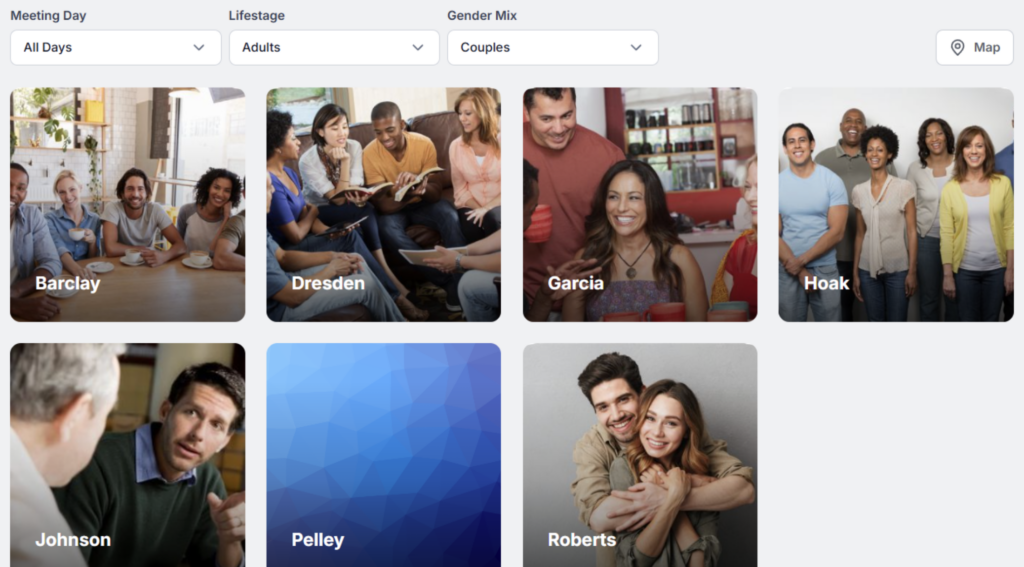
- Sleek Search Filters: A cleaner, more intuitive way for users to find groups by childcare, day of the week, or interest.
- Enhanced Mapping: Pinpoint group locations with a high-performance map interface.
- Beautiful Image Cards: Visual-first cards that highlight the personality of each group.
- One-Hover Actions: Users can now hover over a group card to instantly register, email the leader, or view deeper details.
6 Tips for a Better Church Event and Group Directory
As you implement the new Groupfinder, here are the answers to the most common questions from our church partners.
- Should we use Groupfinder if we just have a handful of small groups? If you have fewer than five groups, a standard registration form is often more efficient. If you are planning to grow, starting with the Groupfinder sets a foundation that scales with your ministry.
- How do we protect our group leaders’ privacy while still publishing group or event details? Leader information is hidden. Churchteams will notify the leader of the inquiry.
- How can we ensure leaders follow up with new sign-ups? Show your leaders exactly what Groupfinder looks like on your website so they can see what guests see. Encourage a “first touch” within 48 hours to capitalize on the momentum.
- How do we track if Groupfinder is actually working?
- Staff Alerts: CC your coaches or staff on confirmation emails for immediate awareness.
- Automated Reports: Schedule a weekly report to see everyone who joined a group in the last seven days. Include the Notes on the reports so staff can see the contact logs.
- Can we automatically hide full groups? Yes! Set capacity limits for each Group. Adjust your Groupfinder settings so that “Full” groups are hidden.
- How do we switch to the new Groupfinder UI? If you’re currently using our legacy Groupfinder, it will remain active. To upgrade to the modern look, follow these steps:
- Opt-in: Ensure you are using the 2025 UI by clicking the New U/I banner on your home screen.
- Generate Code: Navigate to Communicate > Website Integration.
- Embed: Copy the new link or embed code and replace the old version on your church website.
See Groupfinder in Action
Want to see how it looks on a live site? Check out our Groupfinder listing on our Demo Website to experience the new Small Groups page layout.
If your entire website needs a refresh, we can help with that, too. We offer beautiful, easy-to-manage Church Websites designed to integrate perfectly with your member data. Learn more here.
Yes. GroupFinder embeds on any website supporting iframes, including Duda, WordPress, Squarespace, and Wix, without custom development or IT support.
When a visitor submits a join request, the group leader receives an automatic email or text notification based on their Churchteams notification settings — no manual checking required.
Yes. GroupFinder includes a map view that shows where groups meet, helping visitors identify groups near their home or workplace.
