
Parents trust your church with the most important people in their lives: their children. A reliable, secure check-in system isn’t just a nice benefit to your children’s ministry. It’s a necessity and speaks volumes about how seriously your church takes safety and family ministry. The best child check-in software does three things well: it protects kids with security codes and a record of every drop-off and pickup, it’s fast for volunteers and parents, and it lives inside your church management software instead of beside it.
This guide walks through what to look for, what to ask vendors, and how Churchteams handles each piece, including a brand-new check-out feature we recently added.
Why is child check-in critical to your ministry?
Child check-in is often the first thing a visiting family experiences in your church. Before they hear a sermon or meet a friend, parents notice whether the process feels organized, safe and welcoming. It also carries real responsibility. Every child in your care should be accounted for from drop-off until they leave with the right adult. Without a reliable system, churches rely on volunteers recognizing faces, paper sign-in sheets that can get lost, and no consistent way to verify who is supposed to pick up a child.
A good check-in system replaces the guesswork with a process. It offers security codes, important notes visible to the teacher, and a record you can go back to later.
What’s most important to look for in a church check-in system to ensure it’s safe and easy to use?
Look for three things: strong security features, ease of use for volunteers and parents, and full integration with your church management software (ChMS). Here’s what this looks like in practice.
- Security features: Matching security codes that are unique to each child each time a check-in occurs, allergy and other important notes on the child’s tag, a quick way to reach parents during service, and a timestamped record of every check-in and check-out.
- Ease of use: A check-in process that moves families quickly, works on the devices you already have, and handles first-time guests without holding up the line.
- Data that stays in your ChMS: Family data should live in one system, not multiple. Attendance, contact and medical information, and outreach follow-up all stay connected.
What security features should our check-in system have?
- Unique Security Codes. Each child gets a label with a security code that matches the parent. In Churchteams, these codes are randomly generated each time a child is checked-in. An old tag can’t fall into the wrong hands and be used to pick up a child. Codes can be printed or texted to a parent.
- Allergy and medical alerts. Teachers need to see important notes the moment a child walks in. Churchteams lets you add allergies or any custom information to child labels.
- A fast way to reach parents. If a child needs their parent, it’s important to have a way to reach them. An alert on the worship screen can be easily missed. Churchteams can print the parent cell on the child’s name tag. A volunteer can also text the parent from the check-in kiosk.
- Control over who can check a child in. Relatives and family friends sometimes bring kids to church. Churchteams lets you connect those adults to a child’s record and allow them to check the child in. The child’s record stays in their primary household while showing extended relationships and check-in permissions.
- Room limits and reports in case of emergency. Churchteams can track room counts as people check in, so that you can stay updated if you need to open additional rooms. You can see lists of every child checked in, along iwth parent and security information. Print or view these report lists on a smart device.
- A timestamped record of check-in and check-out. This the piece that many systems leave out, and one that Churchteams just added.
Why is a secure check-out important for children’s ministry?
Most check-in systems record when a child arrives. Fewer record when the child leaves and who they left with. Check-out matters, especially for preschools, weekday programs, and any ministry where parents and guardians want proof that their child was handed off safely. Some states or local governing bodies now require this for daycare or school programs.
Churchteams now does both. Every check-in is automatically timestamped, and the new Check-Out page lets volunteers record the moment each child goes home.
How does check-out work in Churchteams?
Start and run check in as you normally do. The check-in date and time are recorded automatically. When you are ready to begin Check-Out, open the Check-In Reports screen from any Check-In Station.
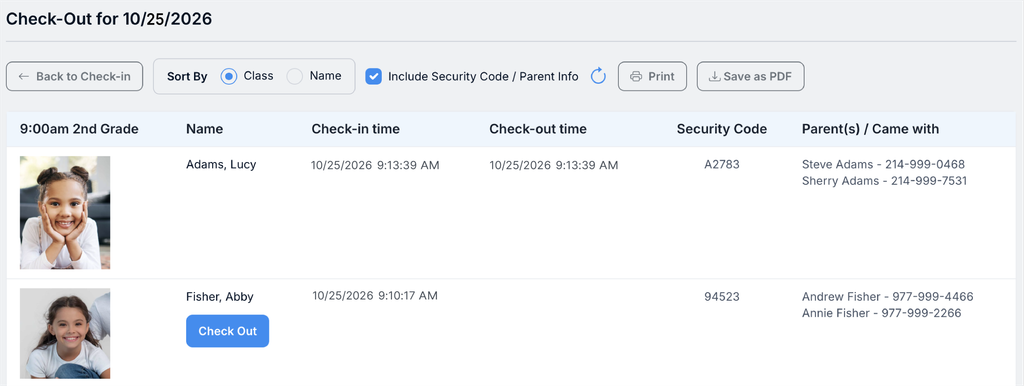
The Check-Out page displays who has been checked in that day, the time they were checked in, who they came with and the unique security code. Click the Check Out button to check the child out. Once Check Out is clicked, a date and time stamp of the check out is added.
Ease of use for Volunteers and Parents
The safest system in the world won’t help if families and volunteers don’t find it quick and simple. Look for a check-in system that is quick, flexible about devices, and easy for staff to start up on Sundays.
Flexible ways to check in. Churchteams lets you choose the check-in method(s) that work best for your families.
- Check-In Stations using a computer and label printer.
- Tablets can be added to expand your stations.
- The Churchteams App allows for the quickest Check-In for families.
- Text-to-Check-In, where families text a keyword and use the returned link to check in.
First-time guests without the bottleneck. With All-Check, check-in and guest registration happen in sync. When a family that isn’t in your database checks in, they first get a registration form. Their form responses automatically place children into the right class and adults into outreach follow-up workflows.
A refreshed, cleaner interface. Churchteams recently updated its check-in screens. The updated look signals to families and guests alike that your technology is up-to-date and secure.
Should your check-in system be a part of your Church Management Software?
A stand-alone application can cover the basics, but it creates a second database to maintain. Every new family, phone number change and allergy update has to be entered twice, and attendance data rarely makes it back to the rest of your ministry.
When check-in is part of your ChMS, it all stays connected. In Churchteams, the family a parent checks in is the same family record your staff use for groups, communication and follow-up. Attendance flows into detail and summary reports. Guest registrations can trigger follow-up workflows, and you can schedule alerts when regular attenders are absent for a few weeks. Volunteer background check information can also be stored on member records, so you know your teachers have been verified. Churchteams integrates with Protect My Ministry for requesting background checks.
Questions to ask before you commit to a Church Check-In Software
It’s important to get a demo of the software before you commit. Have questions ready and ask for a free trial period too, so you can try it for yourself. Churchteams offers a Check-In Demo as well as a 30-Day Free Trial. We’ll even import some of your own data and offer personalized training during the Free Trial.
| Question to ask | Why it matters | How Churchteams answers |
|---|---|---|
| Is your check-in feature part of a larger Church Management Software system? | Two systems means double data entry and disconnected records. | Check-in is built into Churchteams and uses the same family records and attendance reporting. |
| Does it record check-out, not just check-in? | A timestamped drop-off and pickup record protects children and your church. | Yes. Check-ins and Check-Outs are date- and time-stamped. |
| How does it handle first-time visitors? | Guest families want secure check-in for their children. | All-Check combines guest registration and check-in in one step. |
| How are security codes generated and is it the same code each week? | Reused codes can be used by the wrong person. | Codes are randomly generated each time a child is checked in and can be printed or texted to parents. |
| Can volunteers see allergies and medical notes? | Teachers need that information at drop-off, not later. | Allergies and notes can be printed on child labels and formatted to stand out. |
| What hardware do we need? | It’s important to know if you can use what you already have or need to purchase new. | Use Windows or Mac computers or Surface Pro, additional tablets are optional; We recommend Brother or Godex printers. |
| Can we control what volunteers see versus staff? | Not every volunteer needs every detail. | You choose what prints on security labels, and check-out can hide or show security codes and parent info. |
Choose a Church Check-In System that Grows with Your Ministry
The right child check-in software gives parents confidence at drop-off and at pickup, keeps Sunday mornings moving for volunteers, and keeps every family’s information in one place. Just as important, it should come from a support team that listens.
See how Churchteams check-in and check-out work for your church.
- Get a Quick Demo. Give us 15 minutes and we’ll show you how it works and answer your questions.
- Start a Free Trial. No credit card is required. If you have data, we can import it without obligation so you can check out Churchteams with familiar data.
