
The key to reducing church admin burden is identifying tasks that are repetitive, time-sensitive, and rule-based, then automating them. Guest follow-up messages, attendance-related tasks and reports, giving receipts, volunteer reminders, and group communication can all be handled automatically by a well-configured church management software (ChMS) system. It’s time to free up your staff for the relational work that only people can do.
The Real Cost of Church Admin Overload
When your staff is buried in data entry and routine messages, the things that only people can do start getting skipped. The second-visit follow-up that makes a new family feel remembered. The phone call to a family who had questions about nursery care last week. The handwritten condolence card a year after someone lost their spouse. These aren’t small things — they’re the moments that turn church attenders into rooted disciples.
Ministry staff burnout is a real crisis in today’s churches, with administrative overload being a significant factor. When your team spends their valuable time on tasks that could be automated, they arrive at essential relational moments feeling exhausted or may even overlook them altogether. The good news is that you don’t have to sacrifice organization for connection. With the right systems in place, you can ensure that both are handled effectively.
How can you get your staff out from behind the monitor and back in front of people?
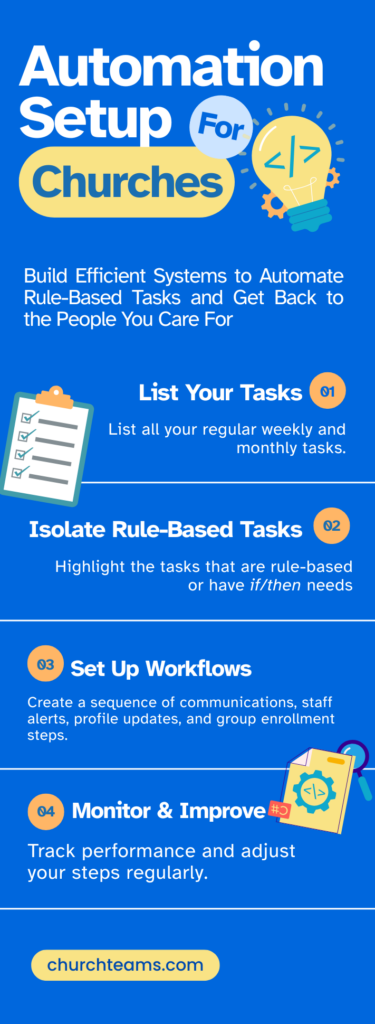
- List every recurring task your team performs each week or month.
Ask your staff to make an honest list. First-time guest tasks. Volunteer schedule reminders. Attendance reports. Birthday greetings. Write it all down. You may be surprised how long the list gets.
- Identify which tasks are triggered by predictable, rule-based events or group sign-ups.
Which of your listed tasks fires the same way every time? If someone attends for the first time, then send an immediate follow-up text, notify the outreach pastor, and email on Saturday. If a volunteer signs up, then send the background check and next steps for training. These if/then patterns are exactly what a solid ChMS like Churchteams is built to handle.
- Map those tasks to automated workflows in your Church Management Software (ChMS).
With your new list of rule-based tasks, set up a workflow sequence that will ensure they are handled automatically. Churchteams is the perfect software system for this automation. From sending text and email messages, notifying leaders, and automatically updating records based on milestones, to tracking next steps, Churchteams has you covered.
- Monitor Your Progress and Refine the Steps
Over time, be sure to monitor which steps of your workflow are working well and which need adjustments. Maybe Monday isn’t the right day to send outreach notifications to the Pastor. Adjust your notification to Tuesday instead and see if contact rates improve.
The goal isn’t to remove your staff from the equation. It’s to remove the repetitive parts from their task list and make their role more personal. When fully executed, the right automations free up your staff to show up for the parts that require their unique presence, wisdom, and heart.
What Churchteams Could Be Doing for You Automatically
If your Church Management System isn’t doing these things on autopilot, you’re leaving a good amount of ministry capacity on the table.
Guest Communication
That first-time guest who filled out a connect card on Sunday? By Tuesday, they should have already received a warm text from your church, referencing their visit. Then, a few days later, a pastoral email, including a personal invitation to come back. Meanwhile, an outreach pastor or deacon receives a notification with the guest’s contact information so they can make a personal phone call to that guest. Set it up once, and it runs every time.
Volunteer Workflows
From the moment someone signs up to serve, your ChMS should handle the logistics. These include confirmation of their interest, along with steps to complete a background check and any required training. Once the volunteer is scheduled, Churchteams can also send reminders to ensure shifts aren’t missed. Workflow sequences can also be set up to alert your staff of background check renewals and to show appreciation at certain service milestones.
Volunteers who feel appreciated stay engaged. This kind of consistent, timely communication used to require a staff member to track and send each message manually. Churchteams aims to reduce that manual lifting for your church admin team.
Donation Acknowledgments
First gifts, recurring gifts, and lapsed giving each deserve a different response. A first-time giver deserves a warm, immediate thank-you. A recurring giver should receive periodic confirmation that their gift is making a difference. And when a recurring gift lapses, your finance team or church admin should be automatically notified so they can follow up or make budgetary adjustments.
Event Communication
When someone signs up for an event, they should receive an automatic welcome message via text or email. Packing lists for youth camp, parking information for a women’s conference, and volunteer opportunities for the annual fall festival can all be automated to keep your attendees informed and engaged.
Milestone Recognition
Birthdays, wedding anniversaries, and serving anniversaries matter to people more than you might think. A simple, personalized message or a staff notification to place a personal phone call on these dates communicates that your church sees them as a person, not just a number. Automated doesn’t have to mean impersonal.
An Easy Automation Win
If you are new to automation, don’t stress. Also, don’t try to build everything in one week! Start here, with one of the biggest and easiest automation wins.
The First-Time Guest Workflow
Of all the automations available to churches, this one delivers the highest ministry return on investment. A timely, warm, personalized message to a first-time guest communicates that they were noticed and that your church values them as an individual. Guest retention data consistently shows that prompt follow-up in the first 48 hours is one of the strongest predictors of whether a first-time visitor returns. Here’s your step-by-step tutorial.
Ready to go further?
We’ve got other tutorials to help you get you going. Everything from thanking a 1st-time donor to caring for lapsed donors and more. Our Support Team is also a great resource for helping you map out and resource your workflow steps. Contact us for more ideas.

