
Churchteams now supports MMS (Multimedia Messaging Service) texting — so your church can send images, audio messages, and write up to 10× more than with standard SMS.
SMS vs. MMS: What’s the difference?
Standard SMS (Short Message Service) has powered church texting for years — but it comes with limitations. It’s text-only and maxes out at 159 characters. MMS (Multimedia Messaging Service) runs over mobile data networks, allowing richer content, such as images, that feel more familiar to how people already use text messaging.
| Feature | SMS | MMS |
|---|---|---|
| Character limit | 159 characters | 1,600 characters |
| Images | Not supported | Yes — photos, flyers, graphics |
| Audio messages | Not supported | Yes — up to 2 minutes |
| Video links | Link only | Rich preview thumbnail |
| Message cost | 1 text each | 3 texts each |
3 things MMS does to improve church texting

Send images.
Attach an event flyer image, a photo of the pastor, or a ministry-specific logo that captures the tone of your message. Visual aids increase interest and engagement while making the message feel more personal rather than automated.
Record audio messages.
Hearing the pastor or volunteer coordinator’s actual voice adds warmth that a template or generic message cannot replicate. It’s easy and quick to use your phone’s mic to record a quick audio message and make instant connections. There is a 2-minute limit per message.

Include more details.
SMS texting limits you to 159 characters – barely enough for “Our event starts at 10am, don’t forget to bring a friend!” MMS raises that cap to 1,600 characters, giving you room for event details, devotional content, or a full weather-related rescheduling alert.
Cost Note: Each MMS message counts as 3 SMS texts for billing purposes. Sending an MMS to 10 people is equivalent to sending 30 basic SMS messages. The Send screen in Churchteams calculates the cost of your texts before you send.
How to send an MMS text in Churchteams
You must have texting enabled in your Churchteams account.
- From the main menu, navigate to Communicate > Text > Send.
- On the Send Text screen, select the Text-to-Church option, then use the blue filter column to filter to the people you want to send your message to, and click Go!
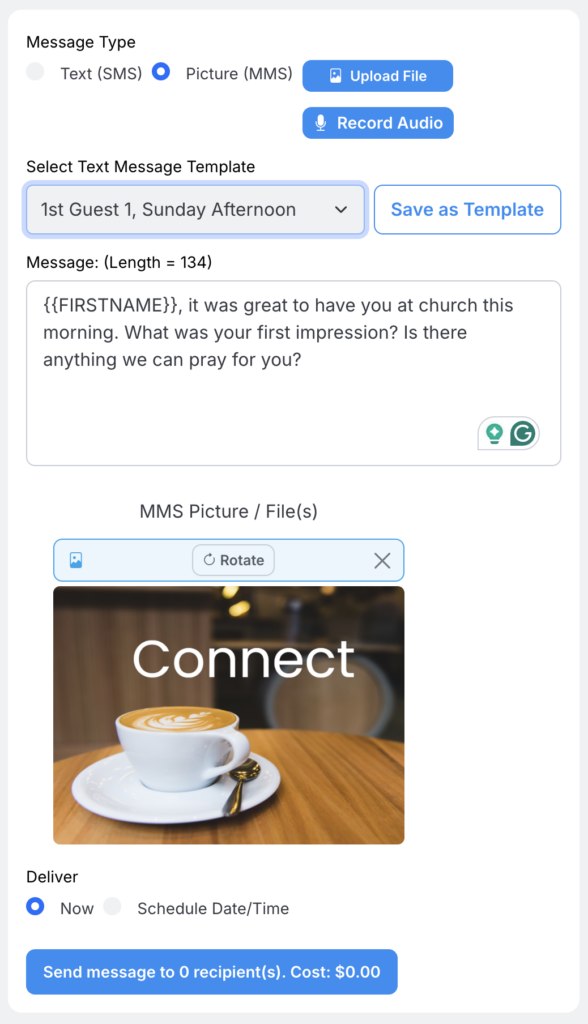
- Be sure to select the Picture (MMS) option, then upload your image file or record your audio message. You can also select a saved template from the drop-down list.
- Compose your text content and send or schedule your MMS.
Bulk pricing plans are available to high-volume texting churches
Because MMS messages cost 3x as much as basic SMS texts, we’ve added high-volume texting plans to help churches that text frequently keep costs predictable. You can select a bulk pricing plan at any time by navigating to Communication > Text > Settings to choose the plan that is right for you.
What if I don’t have a church texting plan?
Getting Started with Text-to-Church
If you’re a current Churchteams client and haven’t yet enabled texting, click the “Find a Phone Number” link at the bottom of your home screen dashboard and follow the setup prompts. We recommend using your existing church office phone number so that members will recognize who is texting them.
Not yet a Churchteams customer? MMS texting is just one piece of a comprehensive church management platform that covers giving, check-in, volunteers, event registration, and small-group management.
Frequently asked questions about MMS texting for churches
MMS (Multimedia Messaging Service) is an upgrade from standard SMS that lets churches send images, audio recordings, and longer text messages (up to 1,600 characters) directly to members’ phone numbers through our texting platform.
Yes. Churchteams’ Text-To-Church feature now supports MMS for all accounts with texting enabled. You can send images, record audio, and compose longer messages directly from the platform.
Each MMS message counts as 3 SMS texts. The send screen shows the exact cost before you confirm, so there are no billing surprises. Higher-volume pricing plans are available.
Yes. MMS messages can be saved as templates and used within Churchteams workflows—for example, automatically sending a welcome image or audio greeting recorded by the pastor to guests who complete a digital connection card.

