
The most effective tools for measuring and fostering spiritual growth are those that link data to action. This includes assessment tools that pinpoint where individuals stand on their faith journeys, platforms that help break down barriers to group connection, and automated communication systems that ensure no one misses their next step. When these tools work together within a cohesive system, they create a robust discipleship picture instead of just functioning as an administrative database.
Most church management platforms are built around organizing data. Fewer are designed around discipleship outcomes. If you’re evaluating software or trying to get more out of the system you already have, the right question to ask of any tool is: “Does it help someone take a meaningful next step?”
What church management tools support discipleship and spiritual formation alongside administration?
Here are the five tools in Churchteams Church Management Software that most directly connect people along a genuine discipleship pathway.
1. GroupFinder
GroupFinder is a tool that allows people to find and join a small group based on filters they select. You configure which groups appear, set the filters (day of week, neighborhood, life stage, study topic), and embed the link on your website.
The ministry value is simple. The fewer barriers between someone connecting with where they fit in, the more people actually end up engaged in the community.
2. GrowthFinder
Growthfinder is a customizable discipleship assessment tool built directly into Churchteams. It allows your church to define the parameters of what a mature disciple looks like. You can use your own ministry language and objectives, then give every member a way to evaluate themselves honestly against that definition.
The default framework uses the default objectives of Character, Knowledge, Perspective, and Skills, but these can be customized to align with the discipleship language your church already uses. Each person receives their individual results. Group leaders receive an anonymous summary showing how the group as a whole is doing — for example, “80% of your group is uncomfortable sharing their faith with others” — along with curriculum recommendations from church leadership.
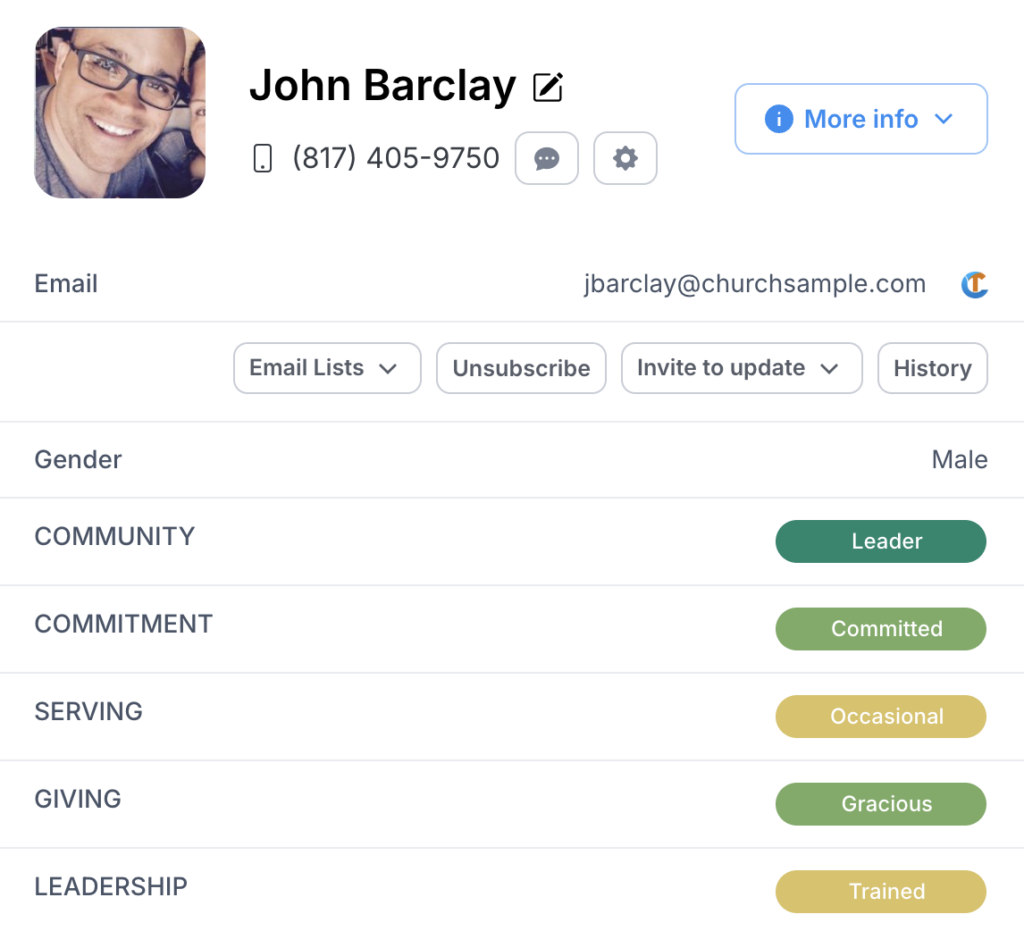
3. Discipleship Marker Tracking
Because Churchteams allows you to create custom fields and milestone markers, your team can define a discipleship pathway to track exactly where each person is on that pathway at any time. In the example to the left, we are tracking Community, Commitment, Serving, Giving, and Leadership.
You can automate weekly or monthly reports showing the discipleship markers you are tracking.
4. Automated Next Step Workflows
A workflow in Churchteams is a set of automated communication and follow-up notification steps triggered by a specific event — someone filling out a connection card, joining a group, completing a registration, or hitting a ministry milestone. You map the goal, resource it with email and text templates, set the trigger, and the system handles follow-up.
One of the most significant uses of workflows is to ensure a decision doesn’t get lost in a spreadsheet or text thread. When someone responds to a connection card, submits a prayer request, or attends their first class, a workflow ensures they hear from someone within the time frame you set, automatically and personally, regardless of how busy the weekend was.
5. Integrated Text and Email Communication
The communication tools in Churchteams include two-way texting, email templates, Text-to-Church keywords, and more. These tools are right in your database that stores your group records, people profiles, notes, and milestones. Messages go to the right people based on where they actually are in your discipleship system, not a generic broadcast to everyone who gave you their email three years ago.
Building a Discipleship System Around Your Tools
Before you configure a single tool, define your church’s discipleship track. What are the stages between “first visit” and “mature disciple who is reproducing”? What does someone need to do, know, and experience at each stage?
Once you have that pathway defined, map each Churchteams tool to a specific stage:
- Connect: GroupFinder, connection card workflows, guest follow-up automation
- Grow: Growthfinder assessment, group attendance tracking, group health reporting
- Serve: Volunteer teams, serving milestone fields on people profiles, communications expressing gratitude, and acknowledging serving anniversaries
- Lead: Leadership development groups, coaching materials, and invitations to meet with church staff
Churchteams is built to serve as the mechanics for your church’s unique discipleship system, not the strategy itself. But the software brings your strategy to life while also making it manageable. It’s important to train your staff to use the tools relationally. Using personalized tags in your communication is just one small way to keep automations personal while making sure no one is forgotten. The goal is never just a checked box. It is a person who is growing, knows their next step, and has been invited to take it.
Measuring the Strength of Your Discipleship Tools
Success looks like more people in groups, more active volunteers, and more people who are taking the next step. These outcomes take time, but they are measurable. This is where Churchteams reporting becomes invaluable. Below are some metrics worth reviewing regularly.
- Movement from Step to Step: What percentage of first-time guests join a group within 90 days? What percentage of Bible Study members are also volunteering?
- Assessment Participation: How many people in Small Groups have completed the Growthfinder Assessment?
- Attendance: Is your group enrollment total growing? What percentage of Small Group members are attending at least 75% of the time?
Churchteams reports can provide all of these data points. Reports can be set up to send automatically to church staff and other leadership at regular intervals, keeping everyone in the know.
Frequently Asked Questions
Growthfinder is a spiritual health and gifts assessment tool built into Churchteams, designed for individual members who want to understand their spiritual maturity and growth areas — with results that connect to pastoral follow-up and personalized next-step recommendations.
Lead with personal benefit. Explain what people will learn about themselves, not what data the church is collecting. Promoting assessments during a relevant sermon series or new member class also increases participation.
Schedule a quick demo of any of our feature tools.
If you’d like to learn how these tools work together as a complete Church Management Software, let us give you a full tour of Churchteams.
