
Key Takeaways
- Many church volunteer programs underperform due to scattered data and unclear processes, leading to burnout.
- To improve your church volunteer system, identify essential information from volunteers, such as availability, interests, and skills.
- Use digital registration forms to streamline volunteer data collection directly into your database, improving organization and communication.
- Prevent burnout by monitoring volunteer engagement reports, expressing gratitude, and utilizing blockout dates.
Why Most Church Volunteer Programs Underperform
We’ve all seen it — a desperate plea from the pulpit or a frantic series of emails heading into the busy Spring and Summer seasons, begging for volunteers. Most church volunteer systems underperform not because of a lack of asking or willing hearts, but because of broken systems. When volunteer data is scattered across spreadsheets, paper sign-ups, and various text messages held by staff, people fall through the cracks. Friction in the sign-up process and a lack of clearly communicated steps and expectations lead to volunteer burnout and, eventually, a “revolving door” of helpers. In fact, when your church tries to organize volunteers with a system that lacks structure, you’ll see inconsistencies arise.
How can your church effectively manage and retain volunteers?
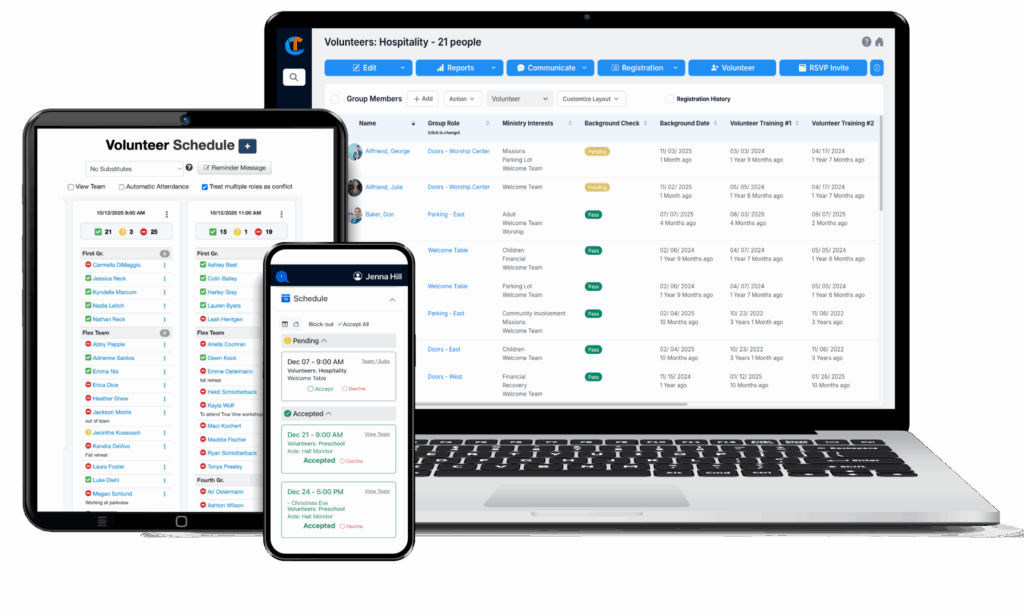
The most effective church volunteer scheduling system is one that is built into your Church Management Software (ChMS). It combines digital registration forms, interest and spiritual gift tracking, scheduling, automated reminders, and a solid reporting system. By centralizing data, leadership can prevent burnout, communicate easily, and ensure volunteers are serving in roles that align with their unique God-given talents.
Step 1: Identify the Information You Actually Need From Volunteers
To move from “filling slots” to “building a team,” you need more than just a name, phone number, and email address. To know where a volunteer fits best, your church needs to collect: If you want your church volunteer system to be successful, gathering detailed volunteer information is essential.
- Availability: When are they available to serve, and how often do they want to help?
- Interests: Do they enjoy working with children, playing a musical instrument, or helping behind the scenes?
- Skills/Experience: Is there a CPA who would be an asset to the finance team? Someone with several mission trips under their belt? Do you have a group of retired people who are skilled with carpentry tools?
- Spiritual Gifts: When volunteers serve in a role for which they are uniquely gifted, joy will abound.
- Life Stage: It’s important to match people with their existing pace of life. College students likely won’t have the availability that a retired person will have, for example.
Step 2: Set Up Digital Registration Forms
The era of the clipboard and paper sign-up is over. The most convenient and quick way to capture the data mentioned above is to use a digital registration form. With Churchteams, you can create custom online forms that volunteers can fill out on their phones. These forms don’t just sit on a desk; they automatically populate your database. This ensures that from the moment someone says “Yes,” their data is organized, available to ministry leaders, and actionable. As a result, implementing a church volunteer system increases efficiency in managing registrations.
Step 3: Centralize the Collected Information in Your Church Management Software
Why is storing the registration information in your ChMS so vital? It streamlines your church volunteer system by centralizing all volunteer data.
- Searchability: Need a volunteer who is fully trained to work with children, background checked, and available every other Sunday? Use your volunteer group in the database to quickly scan or filter for it.
- Simple Communication: Send (or schedule to send) texts and emails to specific teams right from your database.
- One-Stop Scheduling: Make the transition from interested to trained to scheduled without switching systems.
Step 4: Match Roles Using Interests & Spiritual Gifts
The secret to volunteer longevity is proper alignment. We highly recommend utilizing a well-regarded online Spiritual Gift Assessment, such as this one from Lifeway or this one from Team Ministry.
By including Spiritual Gift Assessment results in your digital sign-up forms, the results go directly into your ChMS and remain a part of the person’s profile. No need for a separate church volunteer system that is separate from your main database. You’ll be able to quickly see who has the gift of administration, hospitality, or teaching. Instead of asking a gifted teacher to park cars, you can invite them into a role where they will feel spiritually fulfilled. They stay longer and serve better.
Step 5: Prevent Burnout and Show Appreciation Based on Report Feedback
Data is your best defense against volunteer burnout. Regularly review volunteer reports from your database to see who is active and who has gone quiet. If your reports show that the same 5% of your congregation is doing 90% of the work, you are headed for a crisis. Moreover, tracking participation rates is easier when your church implements a clear volunteer system.
Churchteams allows your volunteers to set “block-out dates,” ensuring they stay refreshed and your scheduling remains smooth and predictable. As you set up schedules based on availability and preferred frequency, you can copy those schedules to future dates, such as every 1st and 3rd Sunday. With a robust church volunteer system, your scheduling process remains flexible and responsive to changes.
Volunteer reports not only help prevent burnout but also remind you who needs a pat on the back. Use automated reports to track milestones (“Thank you for 1 year of dedicated service!”) to foster a culture of gratitude. Churchteams provides the reporting solutions you need to keep volunteers engaged and fulfilled—and your church volunteer system supports this culture of appreciation.
The best church volunteer system is an integrated feature of your Church Management Software (ChMS). Churchteams is a top choice because it combines volunteer scheduling, background checks, interest and spiritual gift tracking, and volunteer follow-up communications in one platform, eliminating the need for multiple subscriptions.
Don’t rely solely on “pulpit pleas.” Lean more toward personalized invitations based on data. Use digital connection cards to find people’s interests and spiritual gifts, then reach out with a specific role that fits their unique profile.
When you match volunteers to roles that align with their spiritual gifts — rather than just filling slots — engagement, satisfaction, and retention all tend to increase measurably.
Use scheduling and attendance tracking software to monitor how often individuals serve. Set healthy boundaries by allowing volunteers to set their own blockout dates in a mobile app, giving them control over their commitments. Attendance reports will give you the information you need to show ongoing gratitude to your volunteers.
Are you ready to streamline volunteer sign-ups, training, scheduling, and reminders?
Learn more about Volunteer Management with Churchteams and request a quick demo today.
